
Bosch ADS X Software Update Version 7.4
Bosch ADS X Software Update Version 7.4
Download the full release note here
New Software Features:
Version 7.4 update includes more model year 2026 and 2025 vehicle coverage and additional ADAS calibrations, with over 4,600 new special tests. New software feature enhancements for the ADS X platform include improved wait screen indicator and customer feedback survey improvements.
Coverage Highlights:
- 2026 Coverage added – ADAS coverage, DTC, Data support and Bi-Directional functions:
- Alfa Romeo – Giulia, Stelvio
- Fiat – 500E
- Jeep – Grand Cherokee, Grand Cherokee L, Grand Wagoneer, Grand Wagoneer L
- Mazda – MX-5 Miata
- Subaru – Ascent, WRX
- 2025 Coverage added – DTC, Data support, Bi-Directional Functions, and ADAS coverage:
- Audi – Q6 e-tron Sportback, SQ6 e-tron Sportback
- ADAS coverage added:
- Porsche – MY2017-2019 911
- Multiple Models and Years Coverage added - Bi-Directional functions
Software Highlights:
Improved Wait Screen Indicator
A spinning progress indicator has been added to screens where the tool is waiting for a vehicle response. In previous versions, some wait screens displayed only a blank white screen or a basic “Please wait” message, which could make the tool appear unresponsive. This update provides a clearer visual indication that the tool is actively processing, helping reduce confusion and giving technicians better confidence that the diagnostic or calibration workflow is still in progress.
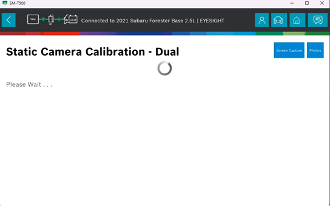
Fig 1 - Wait screen indicator
Customer Feedback Survey Improvements
Updates have been made to the customer feedback survey dialog to improve clarity, capture more actionable feedback from technicians, and help Bosch better understand customer experience trends over time.
Newly registered users can expect to see the survey prompt is shown after 30 days of tool registration. Users who have already interacted with Customer Feedback Survey in previous updates may see their survey prompt sooner.
If the user selects “No,” the prompt will be shown again after 90 days. If the user selects “Ask me later,” the prompt will be shown again after 24 hours.
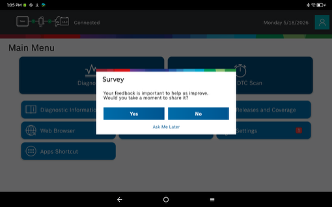
Fig 2 – Customer feedback survey prompt
If the user chooses to take the survey, the tool displays the satisfaction score screen shown in Fig 3. The user can provide a score from 0 to 10, ranging from “Not Likely” to “Very Likely.” If the user selects “I’d rather not say,” the initial survey prompt shown in Fig. 2 will be displayed again after 24 hours.
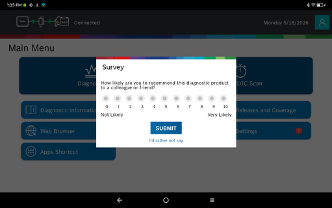
Fig 3 – Customer satisfaction score selection
When a low satisfaction score is submitted, the updated dialog asks the user to identify the reason for dissatisfaction. Available categories include missing coverage, connectivity or communication issues, performance or speed issues, user interface, technical support, software update or maintenance issues, lack of training, value for money, or other concerns.
At least one reason must be selected before submitting the response. The user may also provide additional comments if needed.
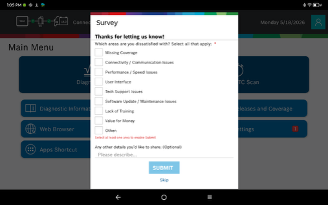
Fig 4 – Follow-up reason selection for low satisfaction responses
For low satisfaction responses, the user may also choose to provide contact information, such as an email address or phone number, so Bosch can follow up if additional detail is needed.
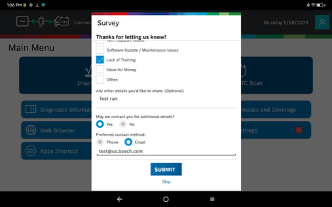
Fig 5 – Optional contact information for customer follow-up
This improvement helps Bosch better understand customer pain points, identify recurring issues, and prioritize future product and support improvements.